


Modern Chromium browsers (e.g. Google Chrome and Microsoft Edge) expose a broad set of capabilities through their extension ecosystem. Although these capabilities have legitimate use cases, they can also be abused to extend the functionality of a browser-based C2 implant. Two of these mechanisms that can provide additional capabilities are Native Messaging Hosts and Isolated Web Applications (IWAs).
Leveraging the browser as a C2 implant can offer several operational advantages to an adversary. Using the browser often provides quite reliable persistence and C2 traffic can be easily blended in with legitimate network traffic. This ultimately makes it more difficult for defenders to detect, as browser-based C2 shifts some of the detection challenge away from identifying an unknown executable, toward identifying malicious behavior occurring inside a legitimate, trusted application.
In August 2026, SpecterOps published "Attack of The Extensions", demonstrating how Chromium extensions can be used as part of C2 architecture and how Native Messaging Hosts and IWAs can act as sidecars to extend the capabilities of an extension-based agent.
Building on this research, this blog explores how these techniques can be identified using Microsoft Defender for Endpoint (MDE). It presents two detection rules, explains the telemetry they rely on, and discusses their limitations.
Native Messaging Hosts allow for direct inter-process communication between browser extensions and a process running on the local system, whilst IWAs can use the Direct Sockets API to communicate over TCP and UDP, enabling network interactions beyond standard browser-based HTTP requests. Both features can be quite beneficial for adversaries as they can now perform actions in a legitimate context and hand off only specific tasks to their Native Messaging Host executable when direct host access is needed.
Native Messaging Hosts
How Native Messaging Works
Chrome Native Messaging provides a mechanism for browser extensions to communicate with applications running directly on the host operating system. The browser starts the Native Messaging Host as a separate process and provides communication between the extension and the host through standard input and output.
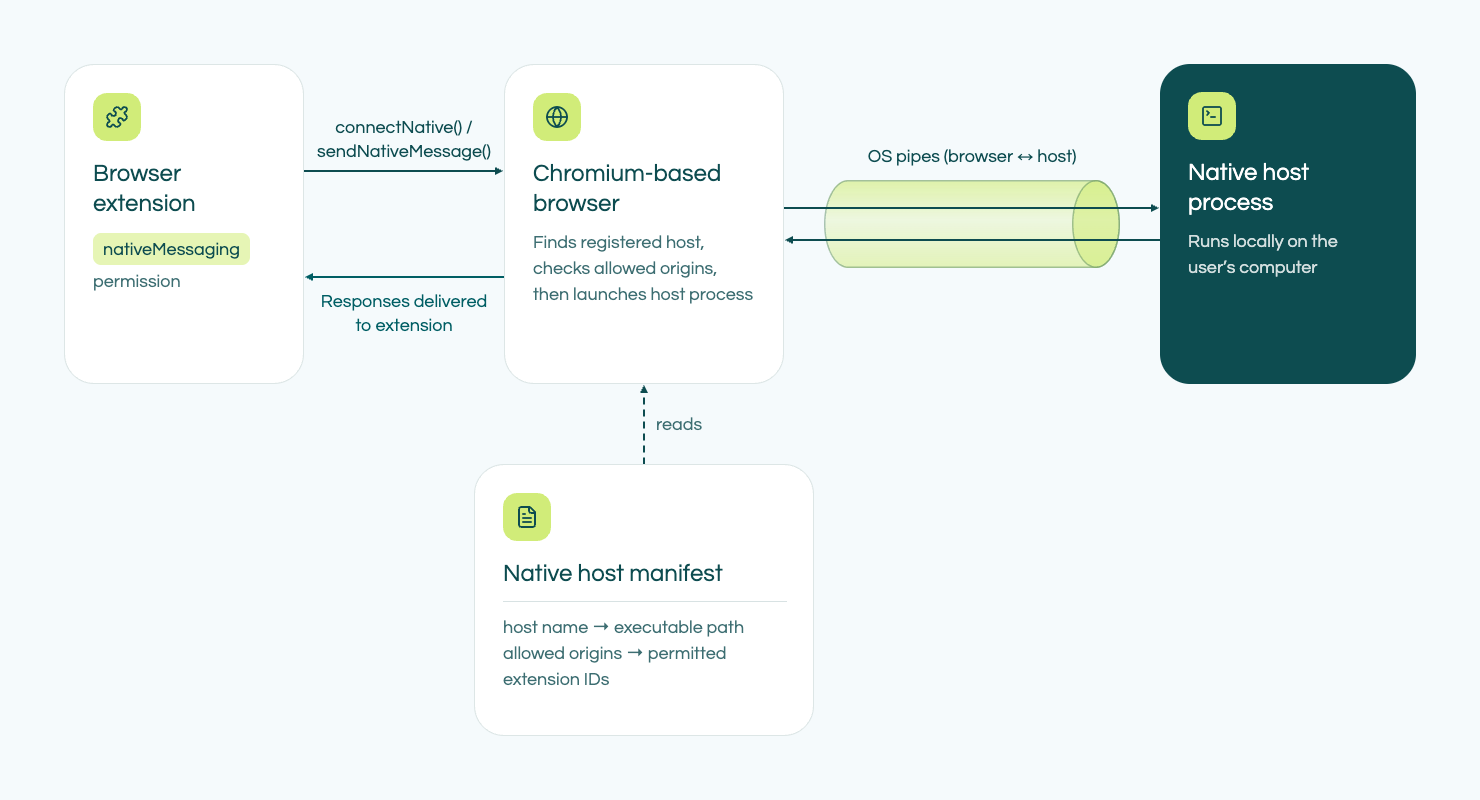
For an extension to use Native Messaging, a corresponding Native Messaging Host must be registered on the system. The host is defined by a JSON manifest containing information such as the host name, executable path, communication type, and the browser extension origins that are permitted to connect to it.
On Windows, Chrome and other Chromium-based browsers use registry entries to locate the Native Messaging Host manifest. When an extension calls the Native Messaging API, the browser uses this registration to locate and start the configured executable.
This creates an important boundary between the browser and the operating system. Extension code normally operates within the browser's security model, while the Native Messaging Host is a separate native process with the privileges of the user running it. This makes Native Messaging useful for legitimate applications such as password managers and other software that needs to integrate browser functionality with a local application running on the user’s system.
The same mechanism can in turn also be useful to an adversary. An extension can use a Native Messaging Host as a bridge to native functionality on the host. In the SpecterOps blog, the Native Messaging Host is used to extend the capabilities of an extension-based C2 agent with operating system functionality.
Detecting Native Messaging Host Activity
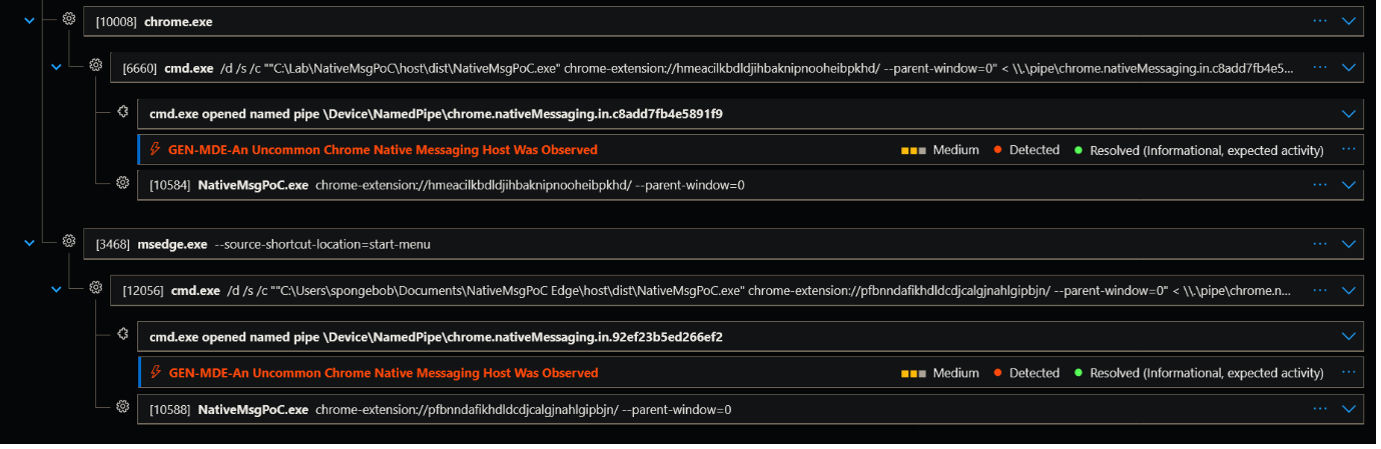
Native Messaging activity typically generates up to four types of events. These events consist of a registry event to register the Native Messaging Host, a named pipe creation for inter-process communication between the browser and the Native Messaging Host, the process-creation event of the Native Messaging Host, as well as an image-load event for loading the image file into memory.
After emulating the activity and analyzing the Defender configuration, we opted to create a detection rule based on the named pipe creation event and correlate it with either the process-creation or image-load events associated with the Native Messaging Host. We selected these events because, together, they form the most reliable opportunity to detect the behavior whilst also providing enough context to filter out benign usage.
When Chromium starts a Native Messaging Host, communication with the host takes place through named pipes. These named pipes follow a specific naming pattern: “\\.\pipe\chrome.nativeMessaging.*”. By correlating these named pipe events with the process-creation/image-load events it is possible to filter out benign usage of Native Messaging Hosts. This is because the named pipe event contains the browser extension ID and the folder path of the Native Messaging Host, and the process-creation events contain further information on the messaging host image file, like the image file’s SHA-1 hash. This makes it possible to filter out any benign usage based on global prevalence, browser extension ID, and folder path of the Native Messaging Host.
It is worth noting however, that this method leaves a particular blind spot. This is because Native Messaging Hosts can also directly invoke scripts, besides Portable Executables (PEs). If an adversary were to use a script instead of a PE, there wouldn’t be a process/image-load event to correlate with and check the SHA-1 of. Fortunately, this would bring other challenges for an adversary, as they will now likely have to pivot from the script, which in turn brings other detection opportunities for the defender.
Why Not Detect Native Messaging Hosts via Registry Event Data?
On Windows, Chromium-based browsers register and locate Native Messaging Hosts through registry keys. This activity only happens once, during the registration of the Native Messaging Host.
Chrome registry key
HKCU\Software\Google\Chrome\NativeMessagingHosts\<host_name>
Edge registry key
HKCU\Software\Microsoft\Edge\NativeMessagingHosts\<host_name>
MDE exposes registry activity through the DeviceRegistryEvents. However, this is not a reliable detection source for this use case. The content of this table is heavily sampled and filtered, meaning that registry activity is not guaranteed to be present in the table. In addition, our testing indicates that the specific Native Messaging Host registry keys do not appear to be monitored by MDE. This was furthermore confirmed by parsing the Defender configuration and evaluating which registry keys are monitored by Defender. As a result, the absence of an event in the DeviceRegistryEvents table should not be interpreted as evidence that a Native Messaging Host was not registered and thus is not viable to use for a detection rule.
Detection Rule
Based on a combination of Native Messaging Host process creation and Named Pipe Creation we’ve created a detection rule which can reliably detect the usage of Native Messaging hosts.
The detection rule uses the file prevalence of the executable’s SHA-1 hash associated with the Native Messaging Host as its primary signal. The rule identifies Chrome Native Messaging activity and evaluates the prevalence of the associated host executable. Hosts with a low file prevalence are flagged because they represent uncommon software within the observed environment.
Isolated Web Applications
We’ve also created an additional detection rule for Isolated Web Applications (IWA). IWAs can be seen as an extension of Native Messaging Hosts, as they provide additional capabilities which Native Messaging Hosts lack.
How IWAs Work
Isolated Web Applications are a Chromium application model designed for web applications that require capabilities beyond those normally available to standard web pages. Unlike a conventional web application that is loaded from an HTTPS origin, an IWA is distributed as a signed Web Bundle and runs from an “isolated-app://” origin.
The isolated environment allows Chromium to provide access to APIs that require additional security controls. One example is Direct Sockets. Standard web applications are restricted to web-oriented communication mechanisms such as HTTP, WebSocket, and WebRTC. Direct Sockets allows an IWA to establish direct TCP and UDP connections. This makes it possible for an IWA to communicate with systems that use protocols other than conventional web protocols.
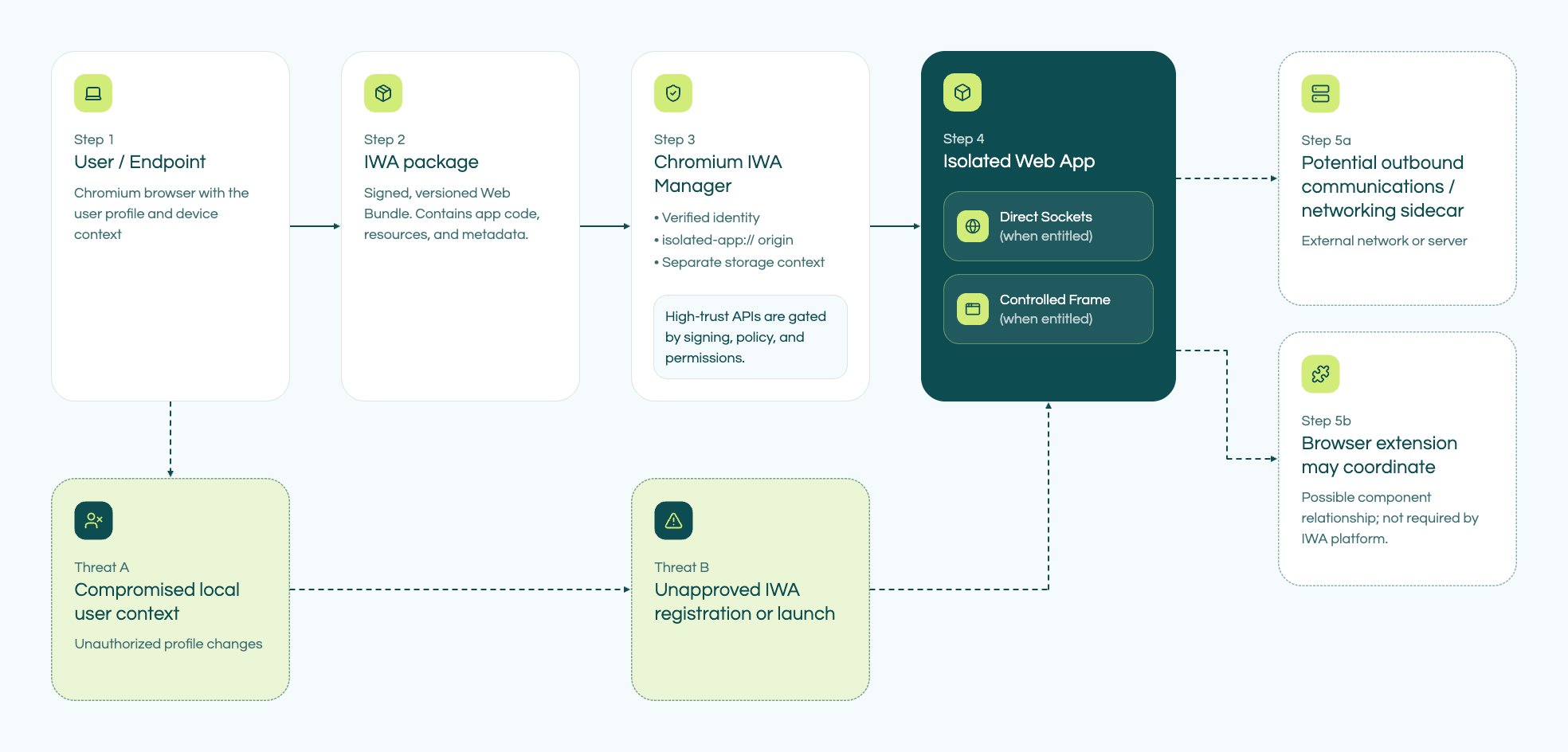
This capability can complement extension-based C2 architecture. A browser extension can provide the primary application logic and browser integration, while an IWA can provide network functionality that is not available to a normal extension. In the SpecterOps research, the IWA is used as a networking sidecar for the extension-based C2.
The combination of these components therefore provides extended capabilities for an adversary. Native Messaging can provide a bridge from the browser to a native process on the host, whilst an IWA can provide access to Direct Sockets for network communication.
Detecting IWA Activity
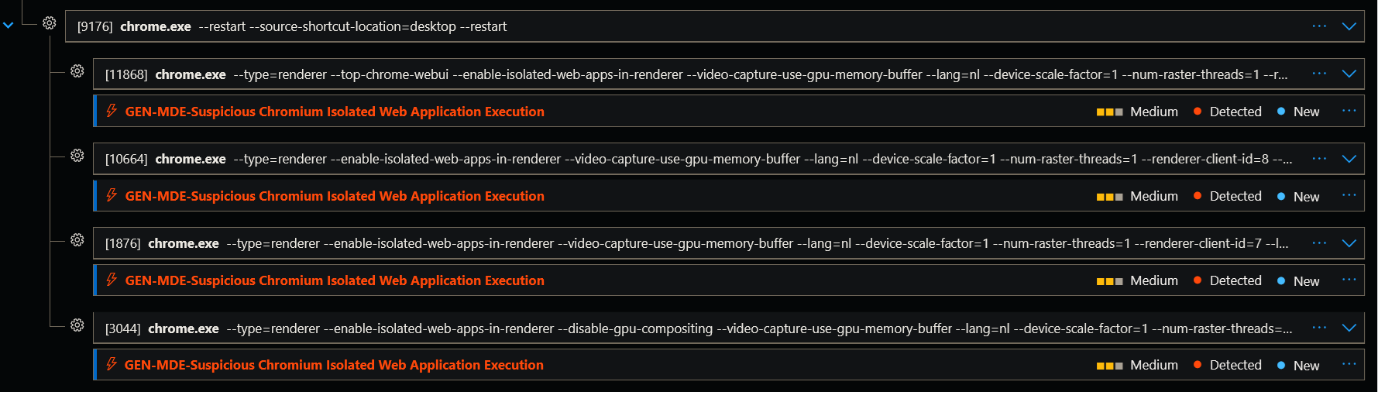
IWA activity generates less telemetry and can solely be identified through Chromium process-creation events.
Launching an IWA results in Chromium process-creation events which have specific command-line arguments. These include “--enable-isolated-web-apps-in-renderer” and “--enable-features=IsolatedWebApps”. Monitoring these specific command-line arguments can therefore help identify Chromium processes involved in IWA execution.
IWA functionality can have legitimate uses, so these command-line arguments should be evaluated in context. An organization that does not use IWAs may try to detect any usage of IWAs, while environments that legitimately deploy IWAs should establish which applications and users are expected to use them. During testing we did not come across a tenant with IWA usage, so it seems this technology is rarely used in benign context, but your experience may vary. Organizations that deploy IWAs legitimately should establish a baseline of expected applications and users before enabling alerting.
Detection Rule
The detection rule we created monitors Chromium process-creation events for command-line arguments associated with IWA execution, as mentioned in the previous section of this blog.
The rule plainly looks for a couple of command-line arguments, as this is the sole telemetry available: “--enable-isolated-web-apps-in-renderer”, “--enable-features=IsolatedWebApps”, and “--app-id”. The first two arguments can indicate that IWA functionality is being enabled or used by Chromium, while --app-id can identify Chromium being launched as an application.
The rule is intended to identify IWA usage rather than determine whether a particular IWA is malicious. Analysts should still investigate the associated Chromium process, application ID, user, and surrounding browser activity to establish whether the IWA is expected.
Combining the Signals
Native Messaging Hosts and IWAs extend Chromium-based browsers in different ways, but both can be incorporated into a browser-based C2 architecture. Native Messaging can bridge browser activity to a native process, whilst IWAs can provide network capabilities through APIs such as Direct Sockets. An extension can act as the central component that interacts with both mechanisms.
This C2 architecture is relevant from a detection perspective because activity traditionally associated with a standalone C2 implant can instead be distributed across (multiple) Chromium components.
The two detection rules provide complementary visibility. The Native Messaging Host rule focuses on the unusualness of the native executable through file prevalence, whilst the IWA rule focuses on Chromium process creation and command-line indicators associated with IWA execution.
Get in touch
If you have questions, you can reach me directly at bart.beekwilder@
Author: Bart Beekwilder
